Every game, a Mac app
Each game opens in a real Mac window that resizes, even old ones made for one size, goes full screen with the green button and gets its own Dock icon. macOS turns on Game Mode by itself.
free · open source · Apple silicon
Your Windows Steam games, on your Mac.
Proton made Windows games play on the Steam Deck. Sevoflurane does it for macOS: install from Steam, press Play, and each game opens as a real Mac app, in a window that resizes, with the fixes other players found already applied.
Each game opens in a real Mac window that resizes, even old ones made for one size, goes full screen with the green button and gets its own Dock icon. macOS turns on Game Mode by itself.
Steam’s interface runs in native Retina windows, with its menus in the menu bar, its notifications as Mac notifications and a Dock menu like Steam’s own.
Your library shows each game’s Mac verdict from players’ real runs, and a Mac filter keeps only what plays. A game whose anti-cheat cannot run on a Mac asks before it installs.
Plenty of your library has a native macOS version too. Install either version from the same Steam, and switch between them later. See how
A game’s first launch takes the settings other players found it needs, from a signed community list, with an Undo. Launch options written for Proton work as they are.
Games run through Dormison, Sevoflurane’s own Wine, with DirectX 12 through Apple’s D3DMetal, DLSS through MetalFX and game video decoded in hardware.
Xbox and PlayStation pads reach games with rumble, through the same XInput and DirectInput they use on Windows.
Every game’s View menu has a frame-rate counter, a limiter, and an overlay with CPU, GPU, power and temperature.
Wallpaper Engine runs in this Steam. Subscribe to wallpapers in its Workshop, and Phosphene, free from the same developer, makes them your Mac’s video wallpapers.
Old games render small. The picture can be upscaled past the game’s own resolution: Lanczos for sharp text, MetalFX for 3D, neural upscalers for anime art.
01 / reception · steam, rehoused
The Windows Steam client still runs in Wine. Its visible interface doesn’t. Every Steam window is a Mac window, under a native title bar, with Steam’s menus in the macOS menu bar and a menu bar icon that launches your games. The Steam Overlay is rendered natively too, and Steam’s notifications arrive as Mac notifications.
02 / recovery · room for the old favorites
A favorite game shouldn’t be trapped in a tiny, fixed-size window. The window resizes freely while the game keeps rendering at its original resolution, for example 800×600, and Sevoflurane upscales the picture to fit. Lanczos, on by default, keeps text sharper than macOS’s own window scaling; MetalFX takes over for 3D games, and visual novels can be upscaled with neural networks made for anime. The choice switches from the game’s View menu while it runs.
03 / formulary · two forms of the same game
Plenty of Steam games ship a native macOS version beside the Windows one. Sevoflurane’s Steam installs either, and you choose per game: Install asks which version to get, with each download’s size and how it runs, and recommends the better one.
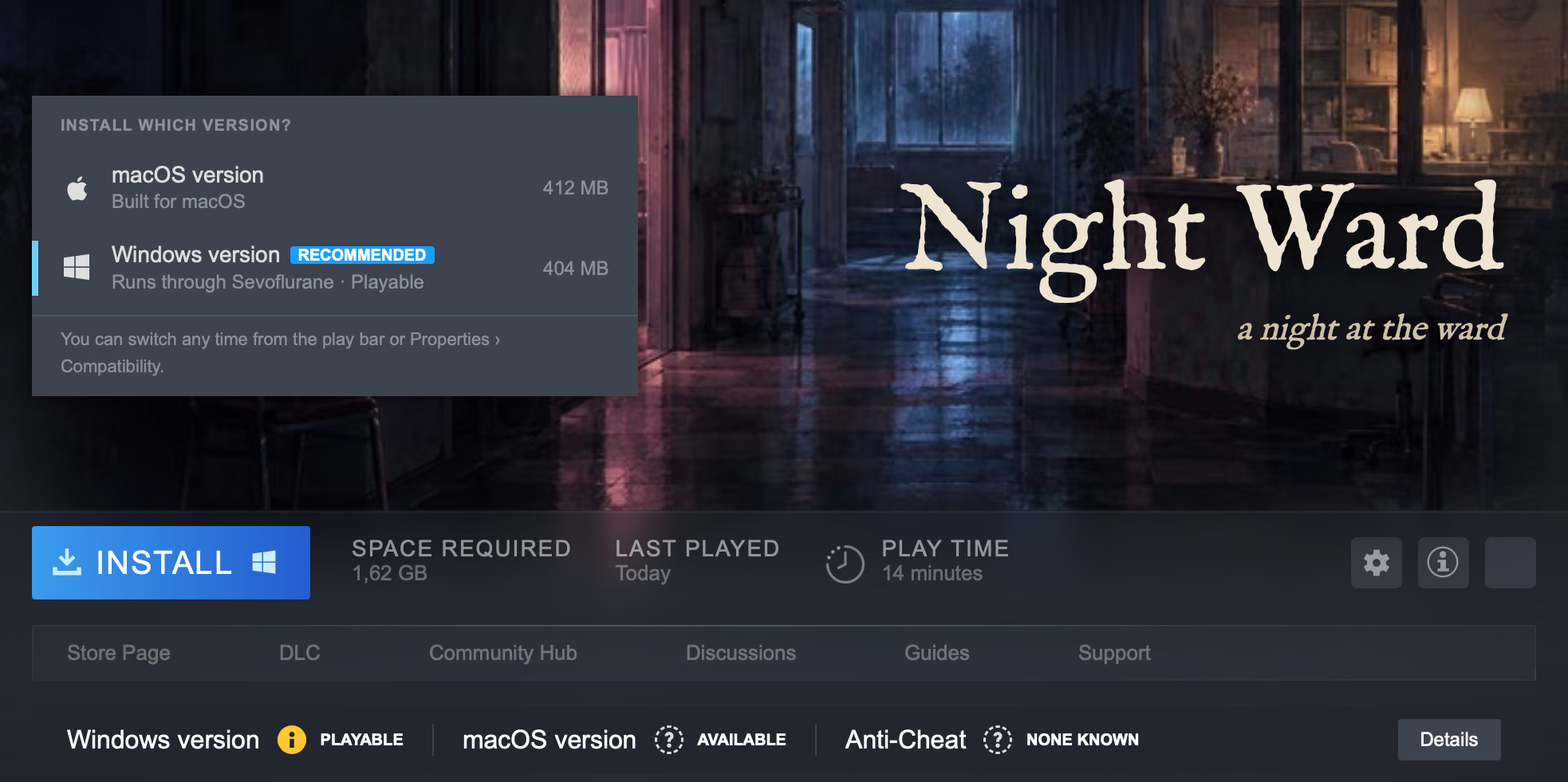
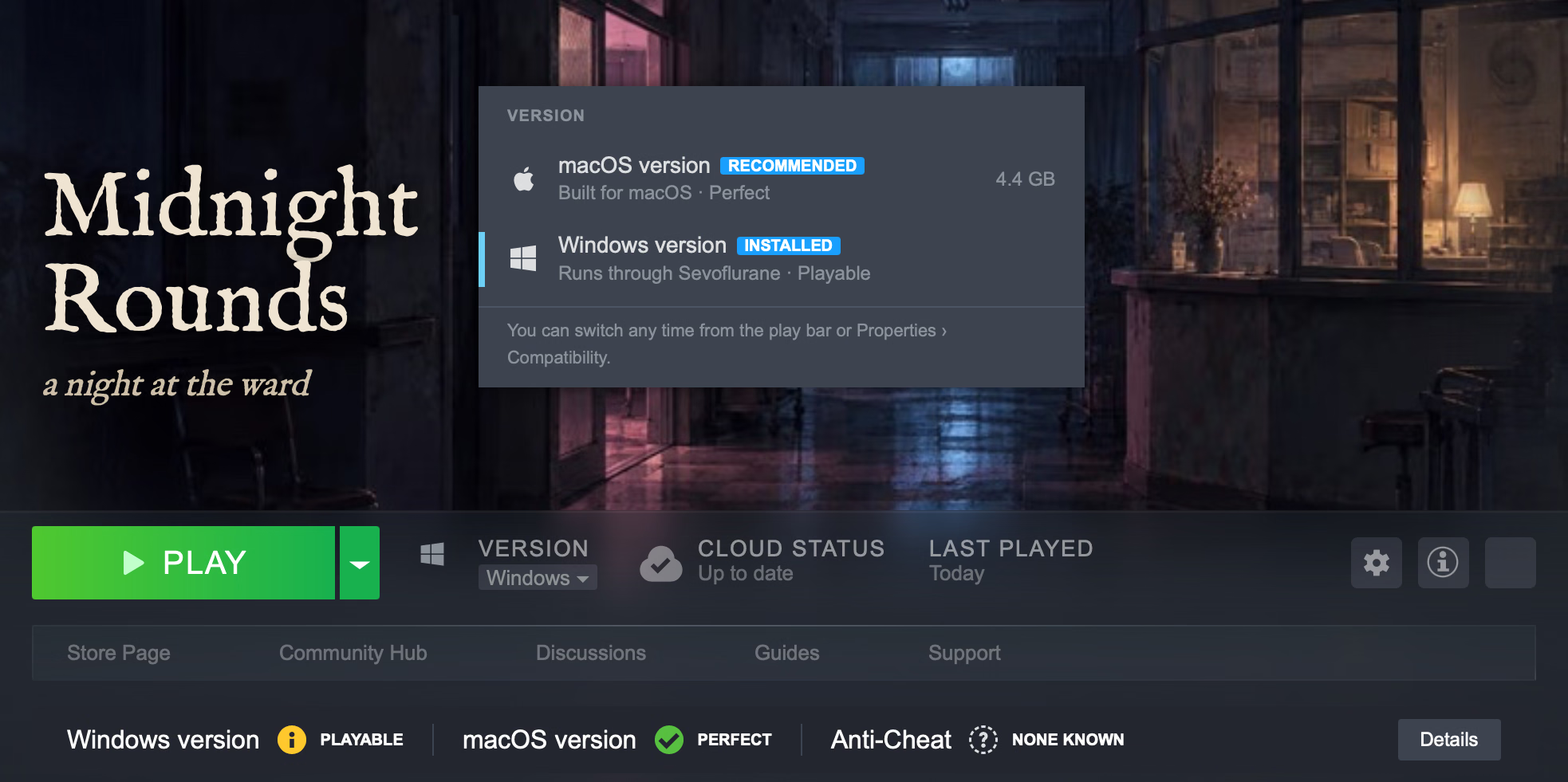
Switching later is one menu away: it says how much Steam will download, and Steam fetches the other version as an update. A macOS version runs natively, outside Wine, and still signs in through Sevoflurane’s Steam, so achievements, stats and cloud saves work without a second Steam client. Steam’s Stop button, Sevoflurane’s menu and quitting the game all end it cleanly.
The Windows Steam client runs inside Wine, hidden. Sevoflurane opens Steam’s web interface in native WKWebViews and connects them to the client over the Chrome DevTools Protocol.
Each Steam window, such as the library, a chat or the overlay, becomes a Mac window. Each game starts as its own Mac app, so it gets a name, a Dock icon and Game Mode. A small shim keeps Steam’s helper processes out of the Dock.
Only the interface is native. The Windows client and the Windows games still run in Wine.
 SteamWindows client
 Sevofluranenative Mac app
 Your gameits own Mac app
the engine underneath
Sevoflurane’s own Wine, with DirectX 12 support and fixes for games. It runs under Rosetta on Apple silicon. Sevoflurane downloads it and manages its settings; CrossOver works as an engine, too.
requirements & limits